

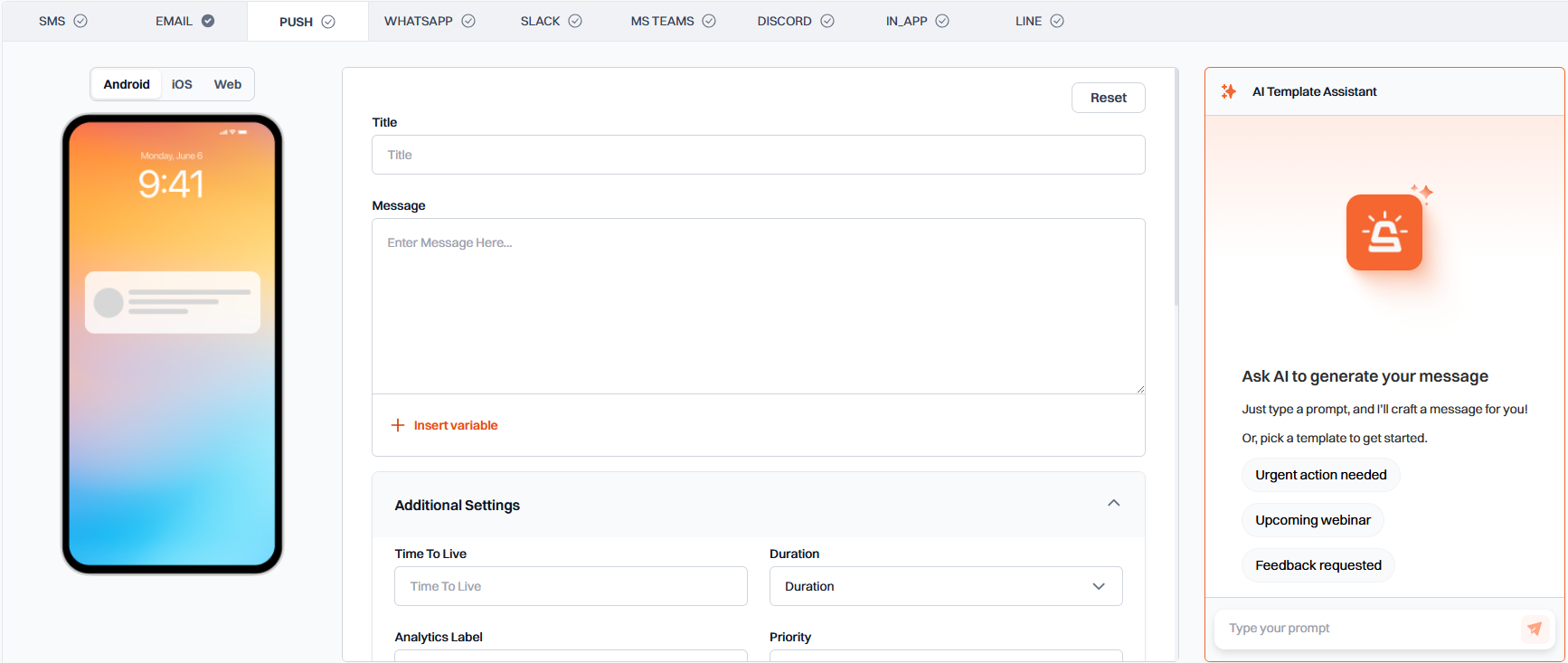
Preview Area
On the left side of the editor, you will find a preview area that shows how your push notification will appear on different platforms. You can toggle between Android, iOS, and Web views to see platform-specific previews.Basic Configuration
1
Title
The main heading of your push notification. This is the first thing users will see.
2
Message Content
The main body text of your push notification. Keep it concise and clear.
- Use the Insert Variable button to add dynamic content like
{{user_name}}or{{order_id}}.
3
Additional Settings
Configure the behavior and delivery of your push notifications:
Platform-Specific Settings
Android Settings
Configure how your push notification appears and behaves on Android devices:iOS Settings
Configure how your push notification appears and behaves on iOS devices:Web Settings
Configure how your push notification appears and behaves in web browsers:Best Practices
- Keep the title under 50 characters for optimal display
- Limit the message content to about 150 characters
- Use images and icons to make your notifications more engaging
- Test notifications on different platforms to ensure proper display
- Use variables to personalize notifications when possible